
This guide explains how to integrate Ondorse into your existing prospects and clients management workflows. It covers integrations with:
- CRMs such as Salesforce and HubSpot
- Back-office operations management systems
- Customer-facing web and mobile applications
Integration types
In our experience, we've encountered 5 types of integration of Ondorse:
| Integration | Description | Collection UI | Best for | Integration time required |
|---|---|---|---|---|
| No integration | Ondorse works without any integration. Cases are created by sales or ops team and decision are reported manually. | Ondorse Portal | Simple use-cases, with low volume, proof-of-concept phase.. | 0 |
| In-app integration via redirection | You have a customer-facing application and Ondorse is integrated in this application: portal is part of the customer's onboarding flow using redirects. | Ondorse Portal, integrated in your app | Fintechs with an in-app self-serve onboarding | 1 week - 3 week |
| CRM integration | Ondorse is integrated in the workflow of a CRM (eg. Salesforce). The collect of client information for compliance is achieved using portal, with a link sent by email. | Ondorse Portal | Sales teams already using a CRM, white-glove or managed onboarding [1] | 1 week - 3 weeks |
| Headless integration | You have a customer-facing application. The compliance onboarding is fully managed in this application. You use Ondorse only as a compliance backoffice (case manager). | Your app | Teams with developer resources available and who wants full control over the user experience. | Unknown |
| CSV import | You use Ondorse import and remediations features to verify an existing clients base. | Ondorse Portal | One-off projects like remediation project, migration or stock recovery. [2] | 1 week - 3 week. |
[1]: managed onboarding = a dedicated person guides the client through the process.
[2]: We provide dedicated assistance for such projects, please reach out.
Ondorse functional overview
Ondorse is a platform that orchestrates the verification process (KYC) of your client (businesses or natural persons) in order to:
- complete a client compliance profile
- make a compliance decision wether to onboard this client or not
The client is deemed verified from a compliance perspective when a compliance decision is output.
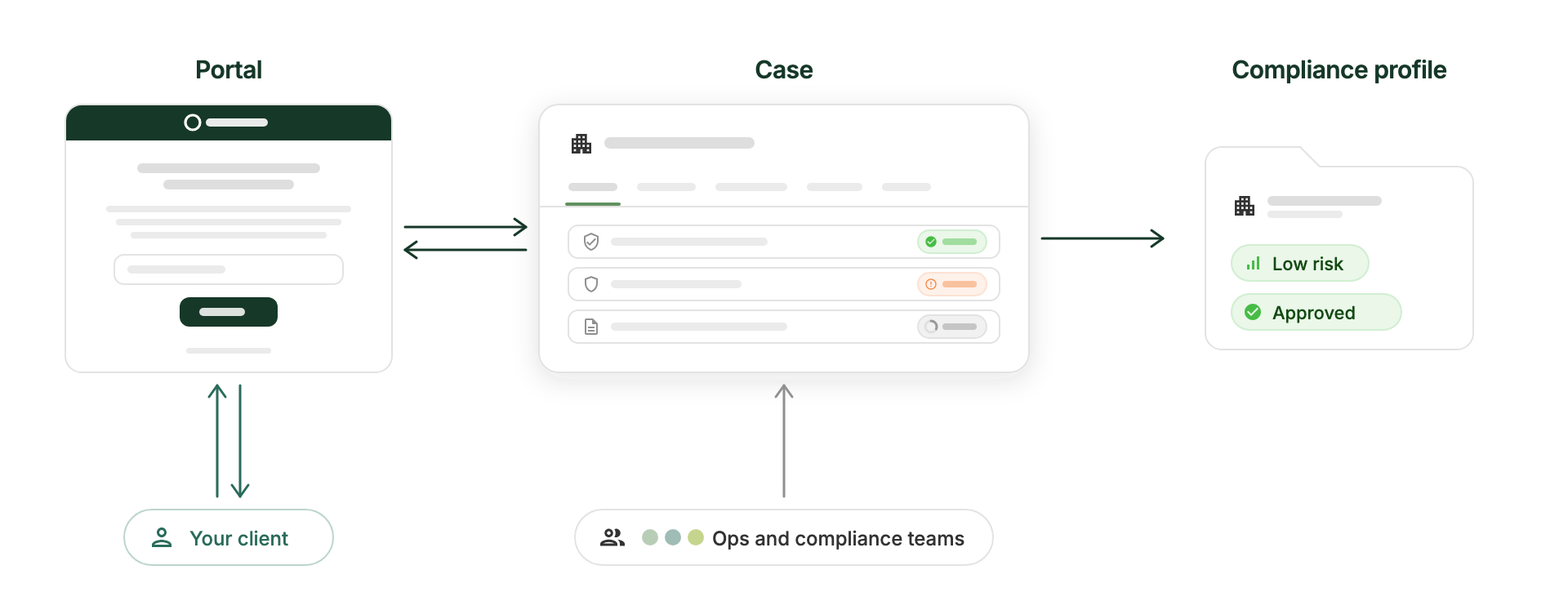
In Ondorse, a client record corresponds to case. The case holds the whole compliance profile of the client which includes documents, attributes, verification points, risk profile and more.
Collect: in this process, to complete the case, data are prompted from the client using a white-labeled client-facing interface provided by Ondorse, called a portal. (Alternatively, you can choose not to use Ondorse's provided portal and instead modify your own customer-facing interface: see headless integration.)
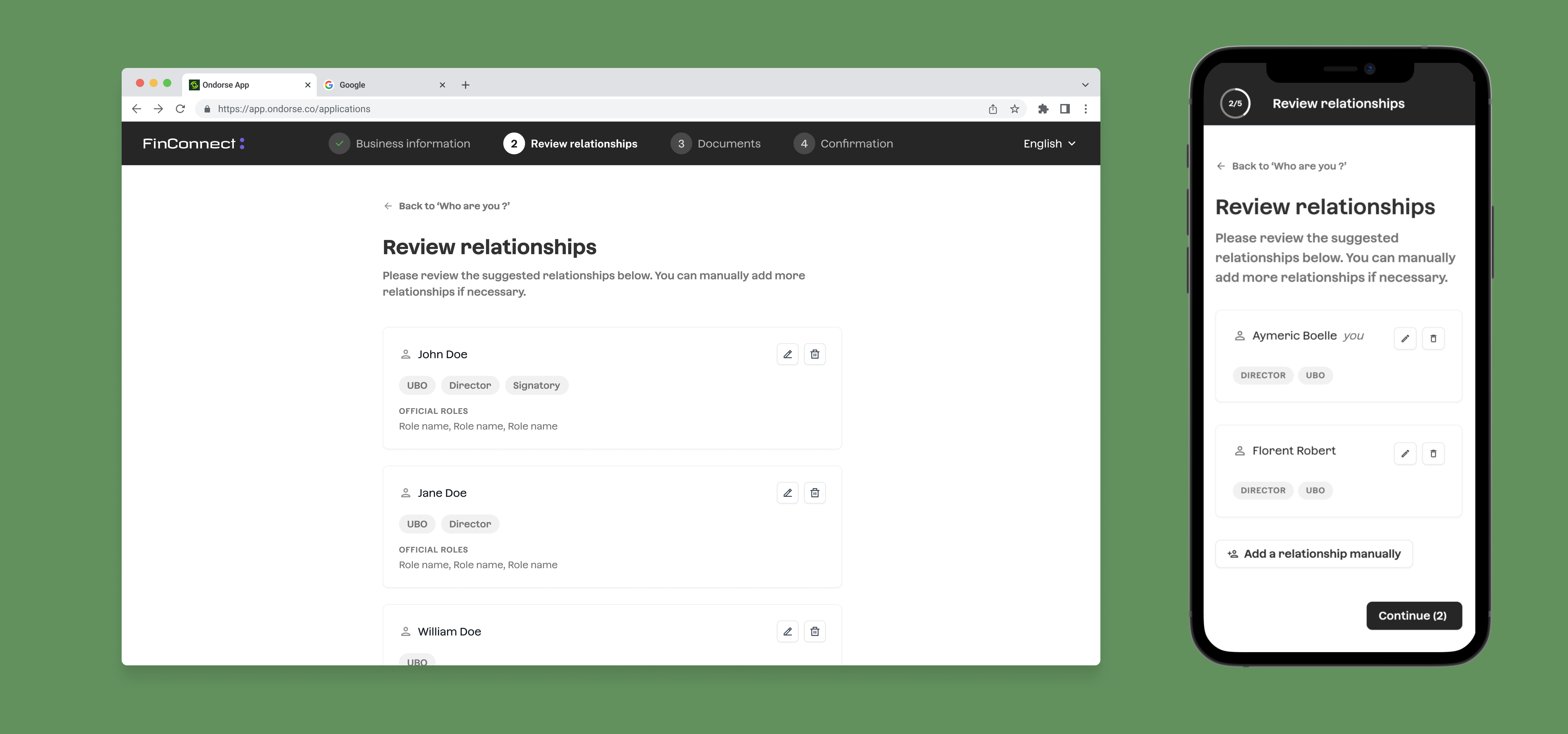
Re-collection: after an initial collect and review of the case, it may happen that corrections or additional informations (extra due diligence) are required from the the client. In this situation, additional data and corrections can be prompted from the client, still using portal.
Data model
| Object in Ondorse | Description | Reference |
|---|---|---|
| Case | The case holds the whole compliance profile of the client which includes, stored in case's field and custom field, as well as connected objects: Business, Person and Document. The case also holds risk info as well as well as treatment status and decision. | Also called "Application" |
| Business | Represents a business entity. It can be the subject of the case, Application.business_id ie the business that is being verified by this KYB.It can also be business entities that are related to the that are related to the subject of the case. Example: shareholder company. | Business |
| Person | Represents a natural person. It can be the subject of the case, Application.person_id ie the person that is being verified by this KYC.It can also be natural person that are related to the subject of the case. Example: shareholder person. | Person |
| Document | A document attached to a case, a business or a person. | Document |
| Portal | For a given case, a hosted customer-facing web page to collect data from the client. | |
| Relationships: persons and business | For a given case, represents natural and legal persons related to this case. It holds their information and their relationships between each other. |
Common integration touchpoints
You don't need to know how a compliance decision is madeReaching a decision involves a lot inside Ondorse case manager: workflow tasks run automatically, reviewers check documents and screening results, some cases escalate to a second-level review — and much more. It's complex, and it evolves constantly.
As much as possible, your integration never has to deal with any of that. Ondorse API give you the abstraction layer over compliance complexity. This layer is made of a handful of simple touchpoints. 👇
(Curious anyway? See What is Ondorse?)
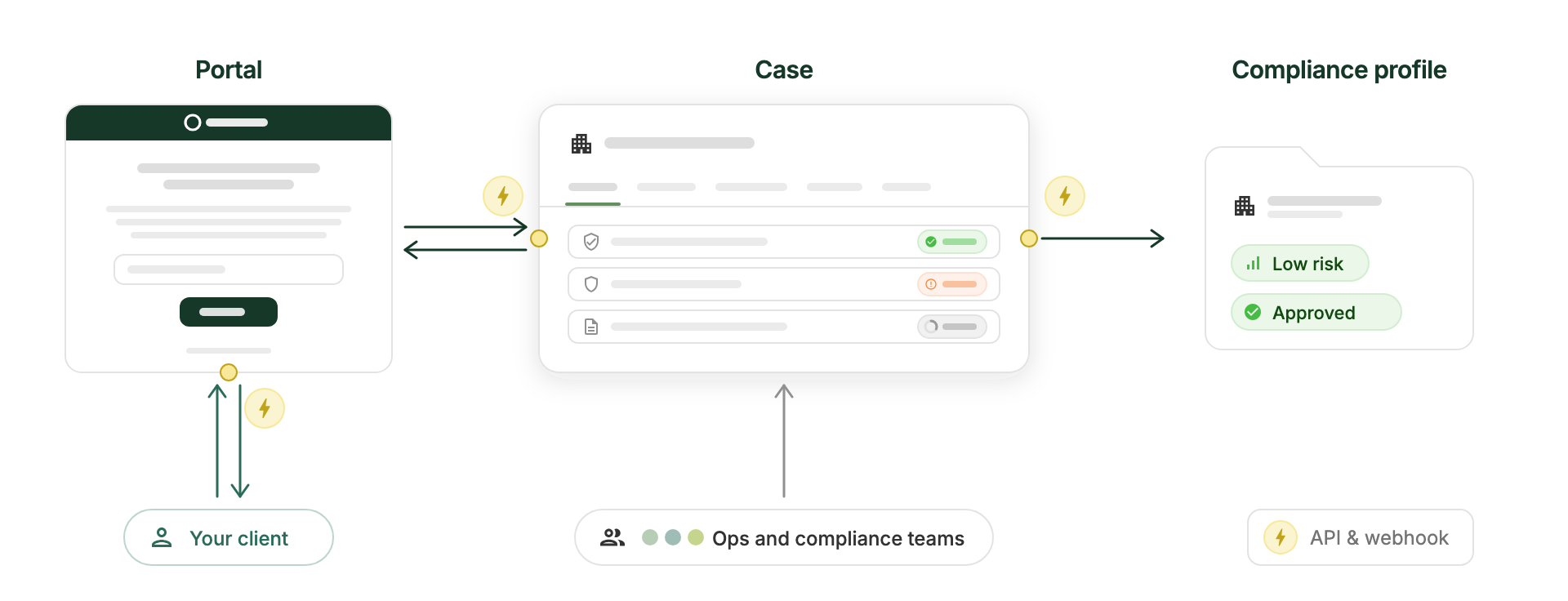
Most integration points and related questions center around these 3 areas:
- Input: How does a client record from your system enters Ondorse as a case?
- Output: How does a case decision and some parts of the client profile are reported back into your system?
- Client prompting: How to integrate portal into your client flow? How does your client access the portal?
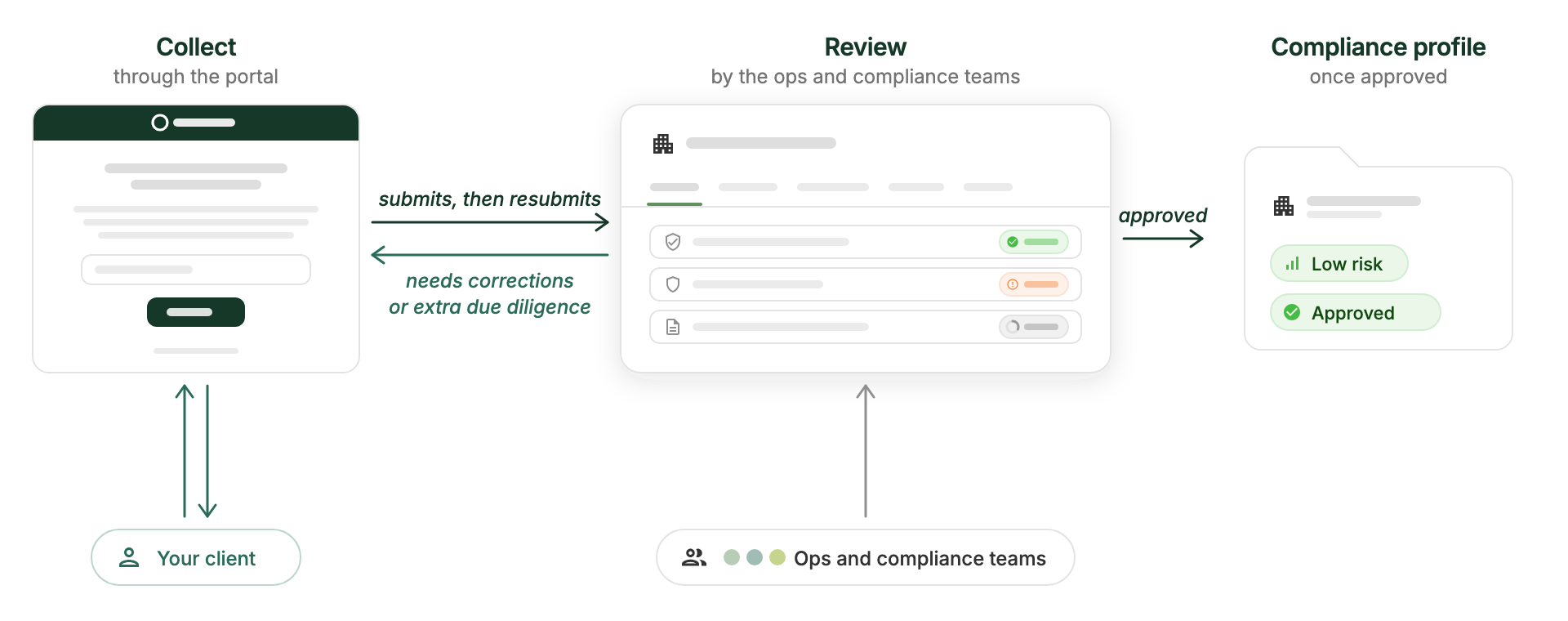
Portal or not portal: prompting information from your client during a KYC is inevitable. Ondorse strongly recommends using its portal feature to do so because it makes this process convenient for the client and efficient for your ops team.
With a user-facing web application
Using portal: redirections
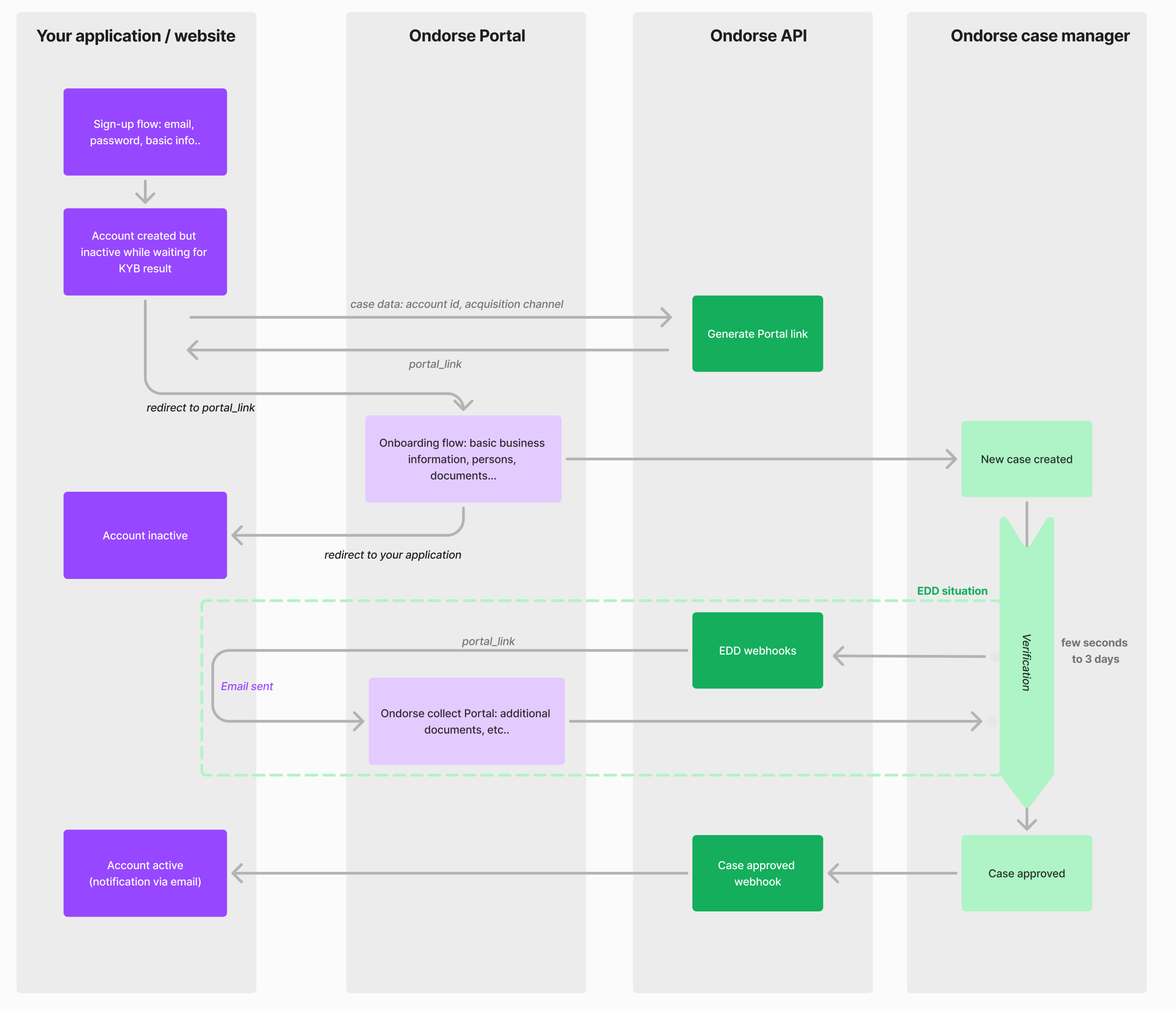
This example integration plugs into your application's sign-up flow: your app creates the customer account but keeps it inactive, then redirects the user to an Ondorse portal URL to complete the KYB flow (business info, persons, documents). After submission, the user is redirected back to your app while verification runs in the background.
The KYC data collection from the user is handled using Portal.
Until the KYB verification is approved, the customer account stays inactive with limited access to your application (e.g., wire transfers disabled). This design has several advantages:
- While verification is pending, the user already has access to your application — you can build engagement: complete setup, train the user, etc.
- Creating the account first gives you more ways to contact and re-engage the user in case of drop-off.
- You can pass down case-specific information, such as internal references (e.g.
account_id) or risk data (e.g. acquisition channel).
If extra due diligence is needed, the portal will be re-opened, containing the necessary instruction for the user to continue the process (additional document, correction..). You can plug into a webhook to catch this portal re-opening.
Once the case is approved, a webhook will be trigged: use it to activate the account.
Endpoints
- Use the endpoint
POST /api/portals(reference) to create a Portal link:- use the param
default_custom_fieldsto pass custom case data such asaccount_idetc.. - use the param
redirect_urlto redirect the user after the submission of the Portal
- use the param
- Use the webhook event
application.submittedto be notified when a case is submitted via Portal- in the payload, you have access to the
application_idandcustom_fieldsvalues (especially the ones coming fromdefault_custom_fields)
- in the payload, you have access to the
- Use the endpoint
GET /api/applications/{application_id}(reference) to get access to case content- use the field
status_reviewto know the decision status - use the fields
risk_scoreandrisk_levelto get information about the risk scoring
- use the field
- Use the webhook event
application.review_updatedto be notified when a case gets an update on itsstatus_review - Use the webhook event
collect.openedto be notified when a case needs an information from the customer- Use payload
data.object.portals.linkto access the link to the collect Portal that you can send to the customer.
- Use payload
Without using portal: headless integration
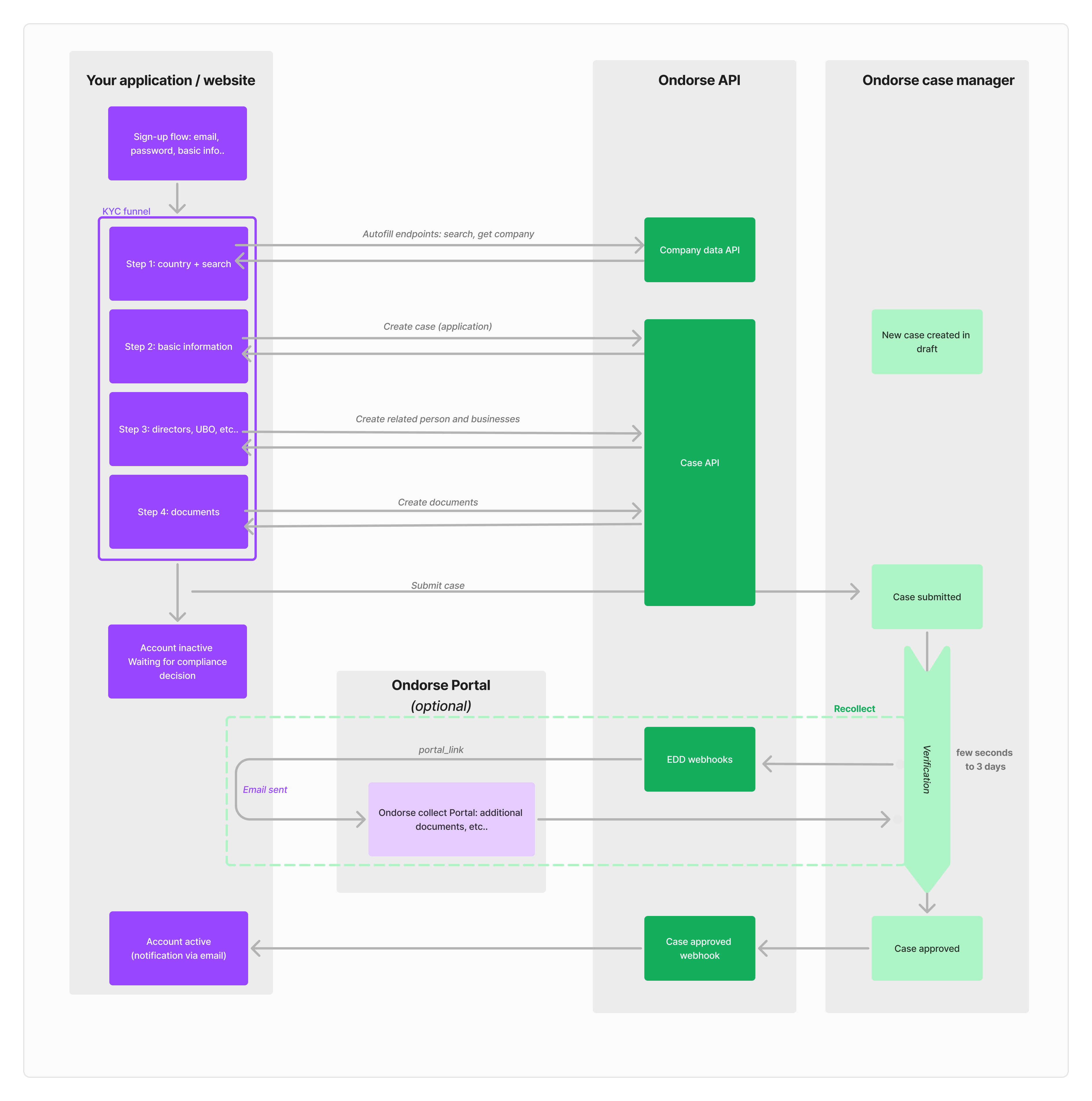
In a headless integration, you build 100% of the client-facing experience yourself and use Ondorse purely as a compliance back office (case manager). No Ondorse portal is shown to your client — every field, document, and status update flows through your own UI using the Ondorse API as source.
Before you go headlessGoing headless means rebuilding what portal gives you for free. Only choose it if you have dedicated dev resources and need to fully own the UI — e.g. the flow must be embedded step-by-step in a journey that can't tolerate a redirect. If you just want control over when/how the client is prompted, a portal-based integration usually gets you there for far less effort.
Consider a hybrid approach: go headless for the initial collect, integrated into your in-app sign-up flow, and fall back to portal for re-collection — which happens less often — for example by emailing the client a portal link.
Endpoints
Find below the endpoints that you can use to build a flow that re-creates portal flow as described in the section above.
The KYB/C profile is embodied by the objects Application , Business and Person. Refer to the documentation for the schema of a KYC profile expected by Ondorse.
Note that these objects can expect Custom fields, defined on your account.
⚠️ Never call these endpoints from a browser or mobile client directly — proxy them through your own backend so your ONDORSE_API_KEY is never exposed client-side.
Autofill
To provide an autofill experience, use these endpoints:
- search company:
GET /api/companies/{country}/search?q=...(reference) - company data:
GET /api/companies/{country}/{registration_number}(reference) to gather data from official registry once you have an exact registration number. If found, it will return company data acceptable forApplication,BusinessandPerson.
Basic information
Use the endpoint POST /api/applications (reference) to create the case as a draft:
- if the case is a KYB (subject is a business entity), use
businessto pass the entity under verification (organization_name,country,registration_number), otherwise useperson(subject is a natural person). - use
external_referenceto store your own internal client/account ID - set
is_draft: trueso the case doesn't enter the compliance workflow yet
Use the endpoint PUT /api/applications/{application_id} (reference) to update the case as the client fills in more data, e.g. to set custom_fields.
Related parties
- Use the endpoint
POST /api/applications/{application_id}/persons(reference) to add each related natural person (director, UBO...):- use
roles(e.g.ACCOUNT_OWNER) anddirect_ownership_percentageto describe their relationship to the case
- use
- Use the endpoint
POST /api/applications/{application_id}/businesses(reference) to add each related legal entity the same way.
Documents
- Use the endpoint
POST /api/files(reference) to upload a document's binary:- send it as
multipart/form-dataand let your HTTP client set theContent-Type/boundary — don't set it manually - this only returns a
file_id; it doesn't attach anything to the case yet
- send it as
- Use the endpoint
POST /api/documents(reference) to attach an uploaded file to the case or a person, using thefile_idfrom the previous step and atype(e.g.ID).
Submission
- Use the endpoint
PUT /api/applications/{application_id}/submit(reference) to submit the case, with no body. This takes it out of draft and into the compliance workflow.
Decision notification
Use the webhook event application.review_updated (reference) to be notified when a case gets a decision.
- Read the field
status_reviewviaGET /api/applications/{application_id}(reference) to get the decision
Recollection
Use the webhook event collect.opened to be notified when a case needs an information from the customer
- Use payload
data.object.portals.linkto access the link to the collect Portal that you can send to the customer.
Advanced capabilities
The following aren't limitations — they're possible today, but aren't the most popular design choices and usually benefit from a bit of guidance from our team. Reach out to your Ondorse contact before building.
Dynamic form driven by Ondorse configuration: adapting which fields/documents you ask for as the client fills in the form, driven by Ondorse's Activation conditions.
Why: in a headless integration, it's usually easier to implement these conditions in your own code rather than relying on Activation conditions.
Embedded identity verification (IDV): submitting your own IDV provider's result into a case without going through Portal.
Why: in a headless integration, it's usually easier to integrate the IDV provider directly, without Ondorse's involvement, then push the IDV proof and details into Ondorse as standard documents.
Headless re-collection: requesting corrections or additional documents from the client without opening a Portal.
Why: in a headless integration, it's usually more convenient to rely on Ondorse's Portal for re-collection, since re-collection flows are less frequent and happen outside your application's main sign-up flow.
Live AI document checks: surfacing AI document validation feedback to your client in real time as they upload, rather than after the fact.
With a CRM (e.g., Salesforce)
Our approach to CRM integrationWe don't provide native integrations with CRMs like Salesforce or HubSpot.
Indeed, we've learned that every organisation has unique compliance workflows and CRM configurations and that one-size-fits-all native integrations always and inevitably fall short because they can't address specific needs.
Instead, we encourage and assist you in building the exact integration you need. No developer resources are required: you can use very popular no-code tools on the market (like Zapier, that your team is maybe already using) or use the ones already included in your CRM (Salesforce MuleSoft).
Our team works closely with you throughout the integration process, providing guidance. We can also put you in contact with experienced Ondorse partners that will build the integration for you.
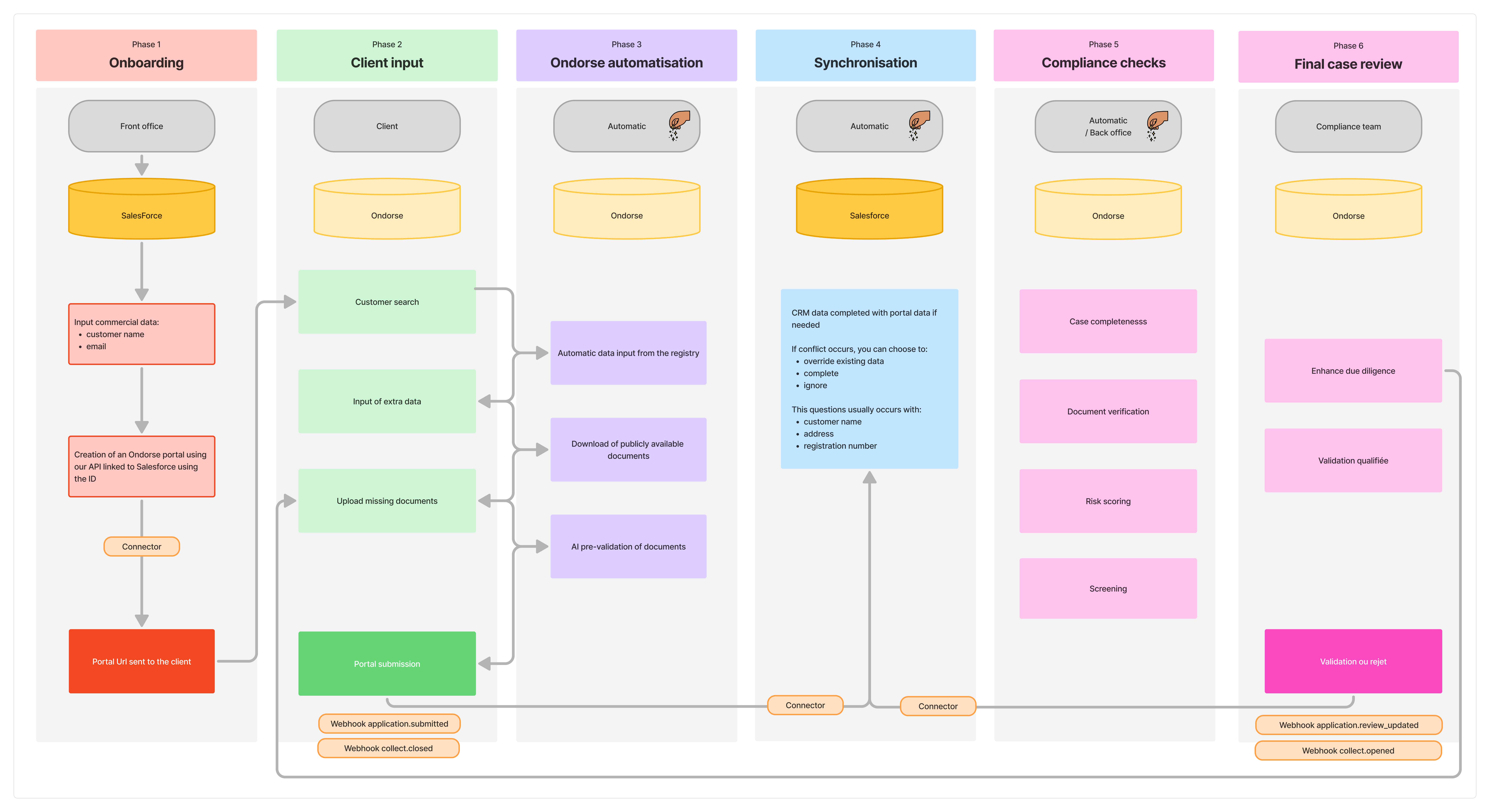
In this example, we present an integration with Salesforce.